Demos & Synthetic Data Factory User Guide
This guide provides engineering runbooks for demonstrating Caber zero trust policy enforcement, subdocument characterization, multi agent delegation, and deterministic synthetic data generation using CaberDemos and CaberDataFactory.
1.1 Overview & Catalog of the 4 Active Demo Scenarios
Located at CaberDemos, CaberDemos consolidates product demonstrations into a unified CLI (caber-demo), Docker Compose overlay stack, and live scenario runner.
| Demo ID | Scenario Name | Primary Ports | Key Capabilities Demonstrated |
|---|---|---|---|
agentic-tools | Genuine Agentic Retrieval with LangGraph & Milvus | 8082 (MCP), 8083 (Chat UI), 19530 (Milvus) | A LangGraph autonomous agent dynamically selects among four MCP tools and issues vector queries, with synchronous Caber policy enforcement at the LangChain BaseTool boundary. |
hipaa-ner | Healthcare NER & Surgical PHI Redaction | 8050 (Console), 8051 (Streamlit) | Evaluates clinical consultation records using ONNX GLiNER models, demonstrating synchronous redaction of protected health information before ingestion into vector indices. |
agentgov-mimic | Multi Agent Delegation & Principal Identity Attribution | 8050 (Audit), 8054 (Gateway) | Orchestrator Agent delegates to subagents across trust boundaries on behalf of specific human Principals, validating that identity tokens propagate correctly to prevent confused deputy leaks. |
graphrag | Enterprise GraphRAG & Access Control Leakage Defense | 7474 (Neo4j), 8050 (Console) | Evaluates knowledge graph traversals across interconnected nodes, proving that access control policies prevent sensitive node traversal leaks. |
1.2 Prerequisites & Workstation Virtual Environment Setup
Before launching any demo scenario, configure your workstation environment:
Prerequisite Services:
- Docker Engine and Docker Compose v2 (required for local OpenSearch, S3 compatible store such as MinIO or VersityGW, Neo4j, PostgreSQL, and Milvus services).
- Python 3.10, 3.11, 3.12, or 3.13.
Step 1: Create Local Python Virtual Environment:
cd CaberDemos
python3 -m venv .venv
source .venv/bin/activate- Step 2: Install Package Dependencies:
.venv/bin/pip install --upgrade pip
.venv/bin/pip install -e ".[all]"
.venv/bin/pip install -e "../PyCaber[auto]"- Step 3: Configure Environment Variables: Copy
.env.exampleto.envand set your OpenAI API key and local service credentials:
cp .env.example .env
# Edit .env to supply OPENAI_API_KEY
1.3 Running Demos via the caber-demo CLI
The caber-demo runner (demo.py) orchestrates docker compose stacks, dataset loading, and service health checks:
# List available demo scenarios
.venv/bin/python demo.py list

# Launch the agentic tools demo
.venv/bin/python demo.py start agentic-tools

# Check running container health and ports
.venv/bin/python demo.py status

# Stop demo and clean up containers
.venv/bin/python demo.py stop agentic-tools
Part 2: CaberDataFactory Synthetic Generation Runbook
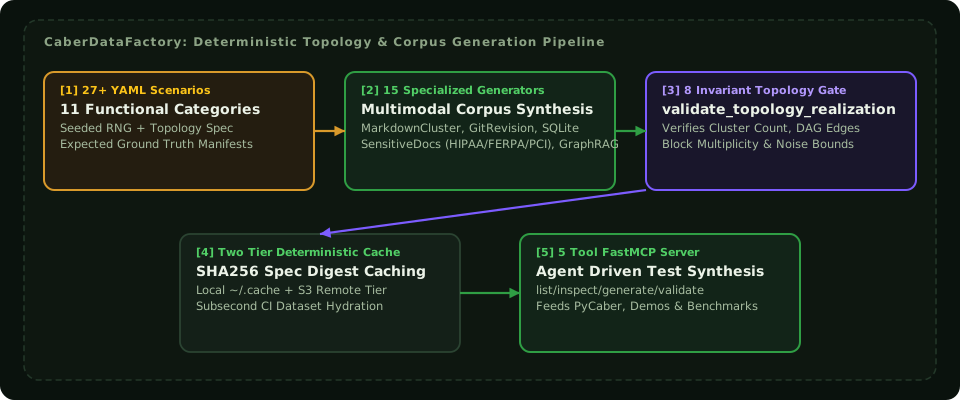
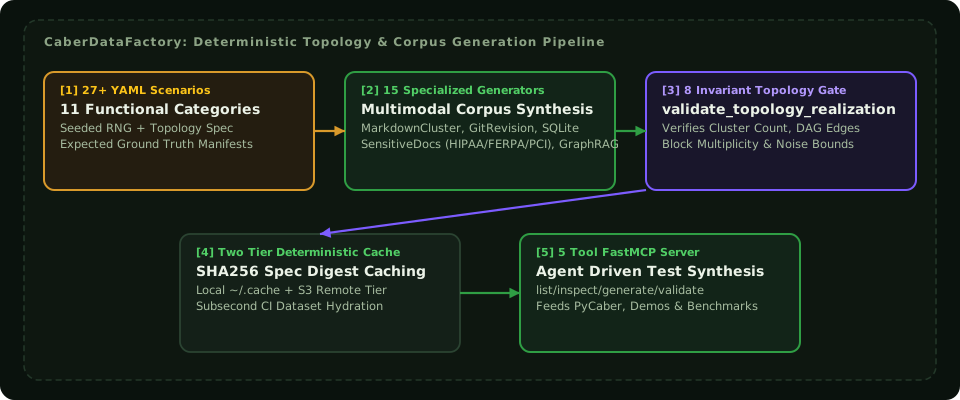
Located at CaberDataFactory, this tool generates deterministic corporate corpora, organizational charts, access control lists, and version cluster topologies for testing.
Validate generated document metadata against CONFIG_SCHEMA.json
.venv/bin/python -m datafactory validate --dir ./output_corpus