Installing & Using the pycaber(auto) SDK
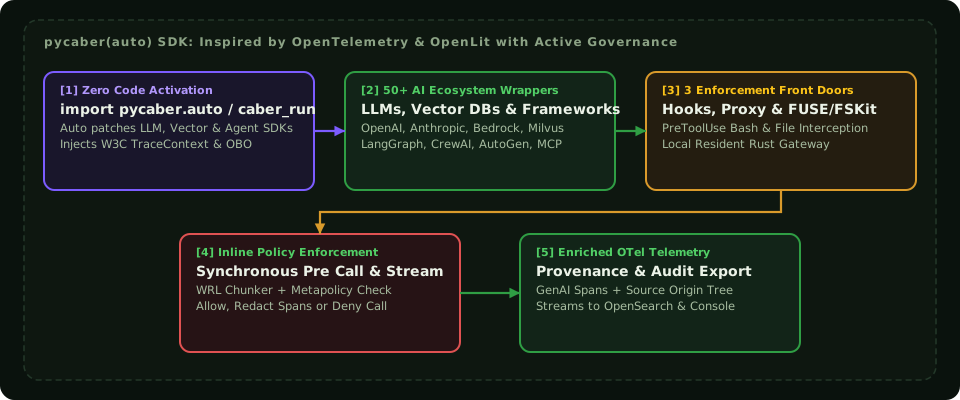
Caber takes inspiration from OpenTelemetry and OpenLit by providing drop in installation and automatic instrumentation for Python AI applications, LLM SDKs, vector databases, and multi agent frameworks, while combining observability with synchronous in band policy enforcement, subdocument WRL Chunker characterization, and Principal identity propagation.
System Prerequisites
- Python: Python
3.10,3.11,3.12, or3.13 - Rust Toolchain (only required when building from source via Maturin):
rustc >= 1.80 - Virtual Environment: Always install inside your project's
.venvvirtual environment.
Option A: Install Prebuilt Wheel with Auto Instrumentation Extras
.venv/bin/pip install "pycaber[auto]"Installing pycaber[auto] includes:
- The compiled Rust native extension (
pycaber._core) containingcaber_core, the WRL Chunker, theRoaringIndexEngine(rbix), theRegoruspolicy evaluator, and the ONNXgliner_nerengine. - The OpenTelemetry and OpenLit compatible
wraptmonkey patching hooks (opentelemetry-api,opentelemetry-sdk,wrapt). - The
caber-runzero code CLI wrapper.
2. Three Activation Modes
pycaber(auto) supports three activation patterns depending on whether you can modify application entry points or want zero code injection at container launch.
Mode 1: Single Line Import (import pycaber.auto)
Add import pycaber.auto as the very first import in your application entry point before importing openai, anthropic, langchain, or mcp:
import pycaber.auto  # Automatically reads CSI_CONFIG_FILE and patches installed AI libraries
from openai import OpenAI

client = OpenAI()
response = client.chat.completions.create(
    model="gpt-4o",
    messages=[{"role": "user", "content": "Summarize the Q3 M&A valuation memo."}],
)
print(response.choices[0].message.content)
Mode 2: Zero Code CLI Wrapper (caber-run)
If you cannot modify application source code, prefix your launch command with caber-run. It injects a sitecustomize.py bootstrap hook into PYTHONPATH that initializes pycaber before main.py or uvicorn starts:
CSI_CONFIG_FILE=/etc/caber/config.json \
  .venv/bin/caber-run .venv/bin/uvicorn app.main:app --host 0.0.0.0 --port 8000
Mode 3: Explicit Programmatic Initialization (pycaber.init())
For fine grained control over enforcement modes, Principal context callbacks, custom Rego policy directories, or configuration overrides, call pycaber.init() or pycaber.configure() explicitly:
import pycaber

pycaber.init(
    application_name="finance_research_assistant",
    environment="production",
    config_path="/etc/caber/config.json",
    enforcement_mode="enforce",          # Options: "enforce", "redact", "audit_only", "disabled"
    metapolicy="freshness_filtered_override",
    enable_wrl_characterization=True,
    enable_gliner_ner=True,
    propagate_obo_identity=True,
)
3. Binding Principal Identity & Delegation Context
To ensure every downstream LLM prompt, RAG query, and MCP tool execution is evaluated against the human user who initiated the request, bind the Principal context at request ingress using pycaber.principal_context:
import pycaber
from fastapi import FastAPI, Request, HTTPException

app = FastAPI()

@app.post("/chat")
async def chat_endpoint(request: Request, payload: dict):
    user_jwt = request.headers.get("Authorization", "").removeprefix("Bearer ")

    try:
        with pycaber.principal_context(
            principal_id=payload["user_email"],
            jwt_token=user_jwt,
            roles=payload.get("roles", ["Analyst"]),
            department=payload.get("department", "Research"),
            agent_id="agent://chat-orchestrator-v1",
        ):
            # All LLM calls, vector retrievals, subagent handoffs, and MCP tools inside
            # this block automatically carry W3C traceparent + signed caber-obo-token
            answer = await run_agent_workflow(payload["question"])
            return {"answer": answer}
    except pycaber.PolicyViolationError as exc:
        raise HTTPException(
            status_code=403,
            detail={
                "error": "Blocked by Caber Policy Engine",
                "verdict": exc.decision_receipt.verdict,
                "metapolicy": exc.decision_receipt.metapolicy,
                "matched_doc_ids": exc.decision_receipt.matched_doc_ids,
                "stale_sources_detected": exc.decision_receipt.stale_doc_ids,
                "trace_id": exc.decision_receipt.trace_id,
            },
        )
4. What Happens Automatically on Every Patched Call
When pycaber(auto) intercepts an instrumented function call, it executes four deterministic steps in band:
- Pre Call Ingress Hook (Prompt & Tool Input Characterization):
- Extracts prompt messages, retrieved RAG chunks, or tool arguments.
- Calls
caber_core::characterizerusing the WRL Chunker (98.7%indexed coverage down to 40 bytes) andRoaringIndexEngine(rbix) to identify every enterprise document fragment present in the input. - Queries freshness cluster status (
CANONICALvsSTALE_REPLICA) and evaluates per source Rego policies plus the active Metapolicy against the activePrincipalContext. - Depending on
enforcement_mode:"enforce": Raisespycaber.PolicyViolationErrorimmediately if the composite verdict isDENY, preventing the prompt from ever leaving the host to an external LLM API."redact": Surgically masks unauthorized 40 byte WRL Chunker spans and GLiNER2 PII/PHI spans in place before forwarding the sanitized prompt to the LLM."audit_only": Logs the violation receipt and continues execution.
- Outbound Context Propagation:
- Injects W3C
traceparentand the cryptographically signedcaber-obo-token(caber.principal.id,caber.agent.chain,caber.delegation.scope) into outbound HTTP headers, gRPC metadata, MCP_metaenvelopes, or subprocess environment variables.
- Injects W3C
- Post Call Egress Hook (Completion & Tool Output Verification):
- Characterizes the LLM response or tool output with the WRL Chunker to detect memorized or leaked restricted content and records
DERIVED_FROM_FRAGMENTedges in the Neo4j Provenance Origin Tree. - Applies egress metapolicy obligations (span redaction, watermarking, or blocking) before returning the result to the caller.
- Characterizes the LLM response or tool output with the WRL Chunker to detect memorized or leaked restricted content and records
- Telemetry & Audit Emission:
- Emits OpenTelemetry GenAI spans (
gen_ai.chat,gen_ai.embeddings,db.vector.query,gen_ai.execute_tool) enriched withcaber.wrl.matches,caber.freshness.status,caber.metapolicy.verdict, andcaber.principal.idto OpenSearch andCaberUserConsole.
- Emits OpenTelemetry GenAI spans (
5. Supported Auto Instrumentation Ecosystem
Caber takes inspiration from OpenTelemetry and OpenLit to provide automatic instrumentation across the AI stack:
| Category | Supported Libraries & Providers |
|---|---|
| LLM Providers | OpenAI (openai), Anthropic (anthropic), Google Gemini / Vertex AI (google-genai, vertexai), AWS Bedrock (boto3 bedrock-runtime), Azure OpenAI, Cohere, Mistral, Ollama, vLLM, LiteLLM, Groq, HuggingFace TGI |
| Agent Frameworks | LangChain, LangGraph, LlamaIndex, CrewAI, Microsoft AutoGen, OpenAI Agents SDK, DSPy, Haystack, Semantic Kernel, PydanticAI, Smolagents |
| Vector Databases | Milvus / PyMilvus, Qdrant, Pinecone, Weaviate, ChromaDB, PGVector (psycopg), OpenSearch / Elasticsearch kNN, MongoDB Atlas Vector Search, LanceDB |
| Tool, API & Process Protocols | Anthropic Model Context Protocol (mcp stdio & SSE), httpx, requests, aiohttp, grpcio, subprocess (bash/shell tool execution), Python builtin file I/O (open / pathlib provenance hooks) |
6. Direct Python SDK API (pycaber.CaberEngine)
In addition to automatic instrumentation, applications can call the Rust engine directly from Python for explicit document indexing, text characterization, or policy verification:
from pycaber import CaberEngine

engine = CaberEngine(config_path="/etc/caber/config.json")

# 1. Index a document with the WRL Chunker into RBIX
index_stats = engine.index_document(
    doc_id="doc://finance/2026-q3-board-deck.pdf",
    text=raw_document_text,
    metadata={
        "classification": "confidential",
        "department": "Finance",
        "policy_id": "policy://finance-confidential",
        "modified_at": "2026-10-15T14:20:00Z",
    },
)

# 2. Characterize arbitrary text or RAG context down to 40 byte spans
matches = engine.characterize(
    text=candidate_prompt_or_completion,
    min_chunk_bytes=40,
)
for m in matches:
    print(m.doc_id, m.byte_span, m.freshness_status, m.similarity_score)

# 3. Evaluate two stage policy + metapolicy for a Principal
receipt = engine.evaluate_governance(
    text=candidate_prompt_or_completion,
    principal_id="alice@corp.com",
    roles=["Finance_Analyst"],
    metapolicy="freshness_filtered_override",
)
print(receipt.verdict, receipt.redacted_text)